21 May, 2026

Author
Getmany
What is MCP Server? A Practical Guide for 2026
The landscape of AI-powered automation has evolved dramatically in 2026, introducing technologies that fundamentally change how freelancers and agencies interact with their tools. Understanding what is MCP server is becoming essential for professionals who want to leverage AI beyond simple chat interfaces. Model Context Protocol servers represent a breakthrough in connecting AI assistants to real-world data and applications, enabling automation workflows that were previously impossible or required complex custom integrations.
TL;DR: An MCP server is a standardized interface that allows AI assistants like Claude to securely access external tools, databases, and applications. Instead of copying and pasting data between systems, your AI can directly read your Upwork notifications, update Notion databases, search Slack conversations, and execute tasks across platforms — all through a single, secure connection.
What Is MCP Server? The Bridge Between AI and Your Tools
Think of an MCP server as a translator and security guard combined. When you ask your AI assistant to "find all my pending Upwork proposals," the assistant cannot access your Upwork account directly. It needs permission and a standardized way to communicate. That's exactly what is MCP server technology provides: a secure, standardized protocol that lets your AI assistant interact with external applications while maintaining strict security boundaries.
Traditional AI assistants live in isolation. They can generate text, answer questions, and provide insights, but they cannot take action in your actual work environment. Model Context Protocol changes this fundamental limitation by establishing a common language between AI models and the tools you use daily.
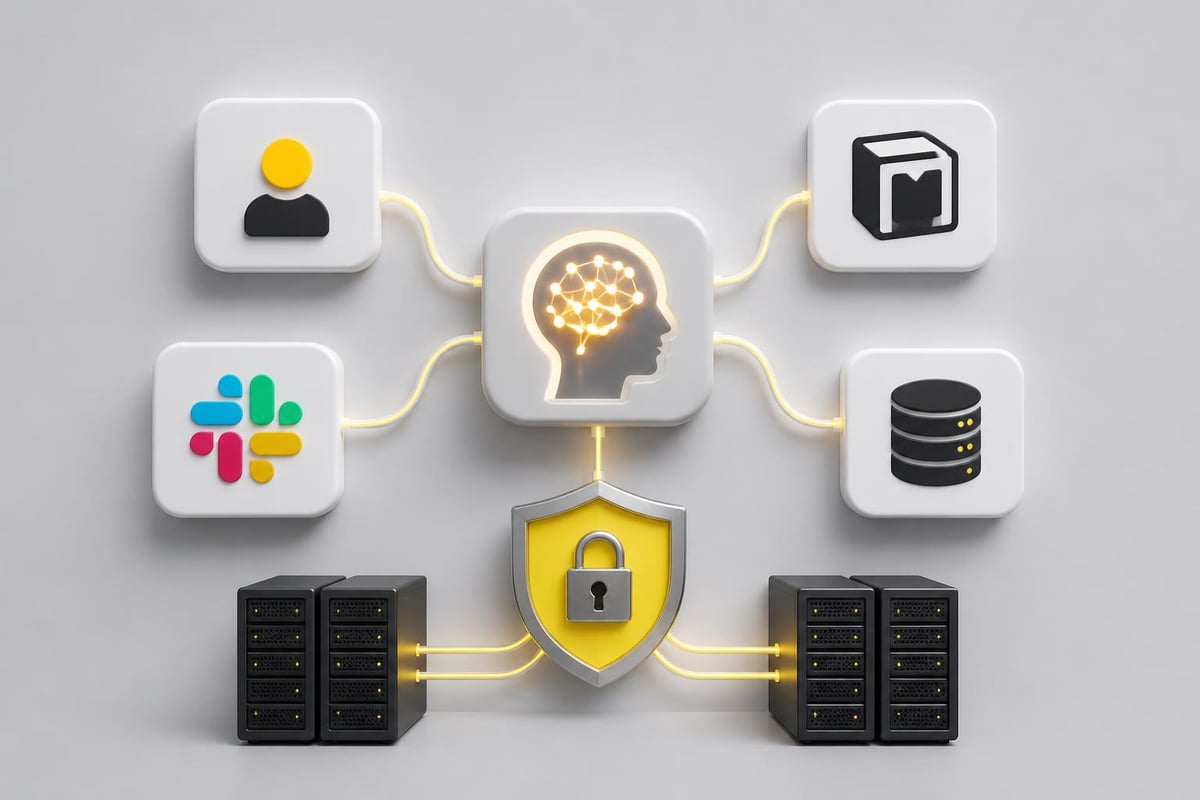
The protocol works through a client-server architecture. Your AI assistant acts as the client, sending structured requests to MCP servers. Each server exposes specific capabilities — reading files, querying databases, posting messages, or updating records. When properly configured, this creates a seamless experience where your AI becomes an active participant in your workflow rather than a passive advisor.
Platforms like GetMany have built dedicated MCP infrastructure specifically for Upwork agencies — automating 85% of workflows from job discovery to proposal generation, helping 300+ agencies save 30 hours weekly.
Why MCP Matters for Freelancers: Three High-Impact Use Cases
Automated Upwork Lead Discovery and Analysis
For agencies managing multiple Upwork accounts, understanding what is MCP server capabilities means transforming how you find and evaluate opportunities. An MCP server connected to Upwork can monitor job postings matching your criteria, extract client history, analyze budget patterns, and compile everything into a structured format your AI can analyze. Instead of manually browsing dozens of listings, your AI assistant retrieves relevant opportunities, identifies red flags, and prioritizes leads based on your historical success patterns.
This level of integration directly impacts your competitive positioning. While other agencies spend hours screening jobs, GetMany's MCP for Upwork enables you to respond faster with more informed proposals — eliminating 80% of irrelevant job listings automatically and surfacing only the highest-fit opportunities. The time savings compound across every project cycle.
Intelligent Notion Workspace Management
Freelancers and agencies rely heavily on Notion for project management, client databases, and knowledge organization. An MCP server for Notion allows your AI assistant to create database entries, update project statuses, link related pages, and extract information across your entire workspace. You can ask natural language questions like "Which clients have overdue deliverables?" and receive instant, accurate answers pulled directly from your Notion databases.
The practical impact extends beyond simple queries. Your AI can automatically update project timelines when you discuss changes, create structured meeting notes linked to relevant clients, and maintain your knowledge base without manual data entry. This transforms Notion from a passive repository into an active collaboration partner.
Contextual Slack Communication
Communication overhead represents one of the biggest productivity drains for agencies. An MCP server connected to Slack enables your AI assistant to search conversation history, draft context-aware messages, and retrieve specific information shared across channels. When preparing a client update, your AI can reference past discussions, compile status updates from team members, and draft comprehensive messages that maintain consistency with your communication style. This scenario illustrates what is MCP server technology in its most immediately useful form: AI that actively participates in your workflows rather than waiting to be prompted.
What Is MCP Server vs Traditional Integration Methods
Understanding what is MCP server technology requires comparing it to familiar alternatives. Each integration method serves different needs and offers distinct advantages.
| Integration Method | Setup Complexity | Real-Time Access | Security Control | Maintenance Required | Best For |
|---|---|---|---|---|---|
| MCP Server | Moderate | Yes | Granular | Low | AI-driven workflows |
| API Integration | High | Yes | Application-dependent | High | Custom applications |
| Browser Extension | Low | Limited | Browser-based | Medium | Simple automation |
| Zapier/Make | Low | Delayed | Platform-managed | Low | Trigger-based tasks |
MCP servers excel at real-time, context-aware interactions. Unlike Zapier triggers that activate based on specific events, MCP enables your AI to explore, query, and make decisions dynamically. The future of AI applications relies heavily on MCP servers because they provide the flexibility AI agents need to handle complex, multi-step workflows.
API integrations offer maximum control but require significant development effort. Every application needs custom code, authentication handling, and ongoing maintenance as APIs evolve. MCP standardizes these interactions, reducing development time while maintaining security and flexibility.
Browser extensions operate within limited contexts. They can automate tasks within web applications but cannot coordinate actions across multiple platforms or maintain persistent state. For agencies managing workflows across Upwork, Notion, Slack, and other tools, browser extensions provide insufficient integration depth.
Ten Essential MCP Servers for Freelancers in 2026
Now that we've covered what is MCP server conceptually, here are the ten most valuable implementations for freelancers in 2026.
1. GetMany MCP for Upwork
The specialized MCP server built specifically for Upwork agencies. GetMany's MCP integration connects your AI assistant to Upwork job feeds, client communications, proposal tracking, and analytics. Unlike generic automation tools, it scores jobs 0–10 based on your agency's profile and past performance — so your AI focuses only on high-fit opportunities. Agencies using GetMany's MCP automation save 30 hours weekly and achieve win rates of 8–30%, compared to the 3–5% industry average.
2. Notion MCP Server
Official MCP implementation for Notion workspaces. Provides comprehensive access to databases, pages, and blocks with full permission management. Essential for agencies using Notion as their central knowledge hub.
3. Slack MCP Connector
Enables AI assistants to read channels, search conversations, post messages, and manage threads. Particularly valuable for teams coordinating client communications and internal discussions across multiple channels.
4. Google Drive MCP
Access documents, spreadsheets, and presentations directly through your AI assistant. Search across files, extract information, and maintain document organization without manual file management.
5. GitHub MCP Server
For technical agencies, this server connects AI to repositories, issues, pull requests, and project boards. Streamlines development workflow documentation and code-related knowledge management.
6. Airtable MCP Integration
Transform Airtable bases into AI-accessible databases. Query records, update fields, and maintain complex relational data structures through natural language commands. The official Model Context Protocol specification covers implementation standards applicable across all server types including Airtable.
7. Calendar MCP Server
Unified access to Google Calendar, Outlook, and other scheduling platforms. Enable your AI to check availability, schedule meetings, and coordinate across multiple calendars without switching applications.
8. Email MCP Connector
Search email history, draft responses, and manage communications across Gmail, Outlook, and other providers. Particularly useful for agencies managing high-volume client correspondence.
9. Trello/Asana MCP
Project management integration that allows AI-assisted task tracking, board updates, and workflow optimization. Maintains project momentum without constant manual updates.
10. Analytics MCP Server
Connect to Google Analytics, Mixpanel, or custom analytics platforms. Enable data-driven decisions by allowing your AI to retrieve performance metrics and generate insights without manual report compilation.
Setting Up Your First MCP Server: GetMany Walkthrough
Understanding what is MCP server conceptually differs from practical implementation. The GetMany MCP for Upwork provides an accessible entry point specifically designed for Upwork agencies — with setup documentation and pre-configured templates that require no custom development.
Prerequisites and Environment Preparation
Before installation, ensure you have:
- An AI assistant that supports MCP (Claude Desktop, compatible terminals)
- Active Upwork agency account with API access
- Basic command line familiarity
- Node.js installed (version 18 or higher)
Installation Process
- Download the GetMany MCP package from the official repository
- Configure your Upwork API credentials in the secure configuration file
- Initialize the server using the provided setup script
- Test the connection by requesting basic account information
Connecting Your AI Assistant
Most AI assistants supporting MCP use a configuration file that lists available servers. Add the GetMany MCP server to this configuration with appropriate authentication parameters. The connection establishes automatically when you restart your AI assistant.
First Commands and Capabilities
Start with simple requests to verify functionality:
- "Show me new Upwork jobs matching my saved searches"
- "What's my current proposal success rate?"
- "Find jobs posted in the last 24 hours with budgets over $5,000"
As you become comfortable, progress to complex workflows. Ask your AI to analyze job descriptions, compare client hiring patterns, and recommend optimal response times based on historical data. The Model Context Protocol enables critical capabilities that transform how agencies operate on platforms like Upwork.
Security Configuration
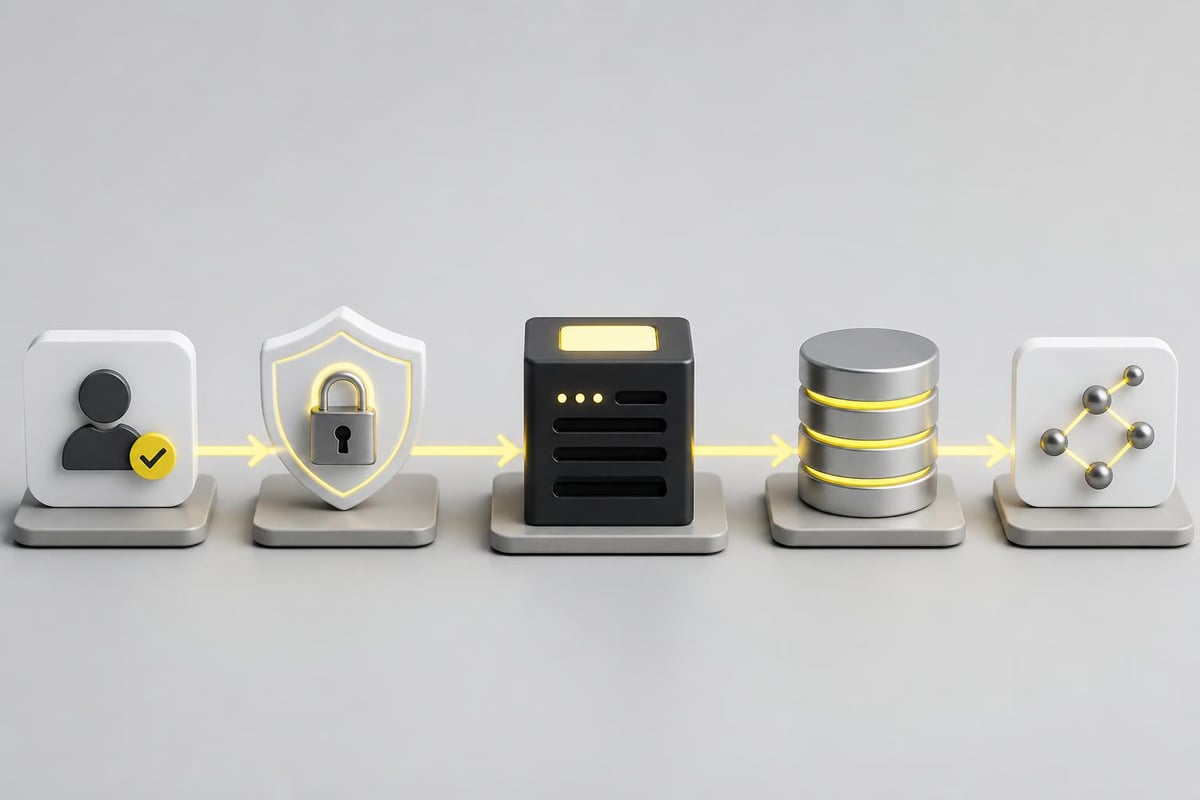
MCP servers implement multiple security layers. Configure read-only versus write permissions carefully. For Upwork integration, you might allow reading job postings and client information while restricting the ability to submit proposals without explicit approval. This prevents unintended actions while maintaining automation efficiency.
The Microsoft documentation on MCP servers provides detailed security configuration guidance applicable across different server implementations.
Common Misconceptions About What Is MCP Server
"MCP Servers Give AI Unlimited Access to My Data"
This represents the most prevalent misunderstanding about what is MCP server technology. MCP implements strict permission boundaries. Each server defines specific capabilities, and you control exactly which actions your AI can perform. Unlike giving someone your password, MCP provides granular access control. Your AI cannot exceed the permissions you explicitly grant.
"MCP Replaces APIs"
MCP does not replace APIs but standardizes how AI assistants interact with them. The underlying data sources still use their native APIs. MCP creates a consistent interface layer that simplifies AI integration across multiple platforms. For developers, this means less custom code for each new integration.
"Only Developers Can Use MCP Servers"
While initial setup might require technical knowledge, using configured MCP servers requires no programming skills. Once installed, you interact through natural language with your AI assistant. The complexity remains hidden behind conversational interfaces. Many agencies successfully implement AI automation tools without in-house development resources.
"MCP Works Only with Specific AI Models"
The protocol design is model-agnostic. Any AI assistant can implement MCP client functionality. While Claude currently offers the most mature implementation, other AI platforms are rapidly adding support. This standardization ensures your MCP infrastructure remains valuable regardless of which AI assistant you prefer.
"MCP Servers Are Just Fancy Plugins"
Plugins typically extend a single application's functionality. MCP servers enable cross-platform orchestration. Your AI can coordinate actions across Upwork, Notion, Slack, and analytics platforms within a single workflow. This coordination capability distinguishes MCP from traditional plugin architectures.
Frequently Asked Questions: What Is MCP Server?
What exactly is MCP server and how does it differ from regular servers?
An MCP server is a specialized application implementing the Model Context Protocol standard. Unlike web servers that deliver HTML pages or API servers that respond to HTTP requests, MCP servers expose structured capabilities to AI assistants. They translate AI requests into application-specific actions and return results in formats AI can understand and act upon.
Do I need programming knowledge to implement MCP servers?
Basic technical literacy helps with initial setup, but extensive programming knowledge is not required. Many MCP servers provide installation scripts and configuration templates. Following documented procedures typically suffices for standard implementations. For complex custom integrations, consulting with developers becomes beneficial.
How secure are MCP servers compared to direct API access?
MCP servers implement security at multiple levels. Authentication prevents unauthorized access, permission scopes limit available actions, and audit logging tracks all activities. When properly configured, MCP provides security equal to or exceeding direct API usage because it enforces consistent access patterns rather than requiring each integration to implement security independently.
Can MCP servers work with multiple AI assistants simultaneously?
Yes, properly designed MCP servers support concurrent connections from multiple clients. An agency might configure one MCP server that serves several team members' AI assistants simultaneously. Each connection maintains separate authentication and permission contexts, ensuring data isolation between users.
What happens if an MCP server goes offline?
AI assistants gracefully handle MCP server unavailability. Requests to offline servers return error messages rather than causing system failures. Your AI assistant continues functioning for other tasks but cannot access capabilities provided by the offline server until connection restores.
Are there costs associated with running MCP servers?
Costs vary by implementation. Some MCP servers are open-source and free to use, though they may require hosting infrastructure. Commercial MCP servers might charge subscription fees. Additionally, underlying services (like Upwork API access or cloud hosting) may incur their own costs. The Hugging Face MCP server documentation provides examples of both free and commercial implementations.
How do MCP servers handle rate limiting from external APIs?
Well-designed MCP servers implement rate limiting awareness and request queuing. When external APIs impose limits, the MCP server manages request timing to avoid exceeding quotas. This abstraction protects your AI assistant from dealing with platform-specific rate limit complexities.
Can I build custom MCP servers for proprietary tools?
Absolutely. The Model Context Protocol specification is open, allowing custom server development for any application with programmatic access. Organizations frequently build internal MCP servers for proprietary databases, custom CRMs, or specialized tools. Research on MCP server security provides guidance for secure custom implementations.

Practical Implementation Strategies for Agencies
Start with High-Impact, Low-Complexity Servers
Agencies new to what is MCP server implementation should prioritize servers that deliver immediate value without extensive configuration. The GetMany MCP for Upwork represents an ideal starting point because it addresses a specific, high-value workflow: lead generation and proposal management. Rather than attempting to connect every tool simultaneously, focus on the integration that saves the most time.
Document Your Workflows Before Automation
Understanding what is MCP server technology alone does not guarantee successful implementation. Map your current processes first. Identify repetitive tasks, data transfer points, and decision-making patterns. This documentation guides which MCP servers provide maximum impact and how to configure them for your specific workflows.
Implement Gradual Permission Expansion
Begin with read-only permissions for new MCP servers. Allow your AI to retrieve information and provide insights before granting write access. This staged approach builds confidence in the system's behavior and prevents unintended modifications to critical data.
Create Validation Checkpoints for Critical Actions
Even with trusted MCP servers, implement human validation for high-stakes actions. Configure your AI workflows to request approval before submitting proposals, deleting records, or making significant changes. Automation should enhance human decision-making rather than replace it entirely.
Monitor and Optimize Performance
Track how MCP-enabled workflows perform compared to manual processes. Measure time savings, error rates, and outcome quality. The systematic study of MCP tool descriptions highlights the importance of clear documentation and well-defined capabilities for maximizing productivity gains.
MCP Servers and the Future of Agency Operations
The trajectory of AI-powered work suggests MCP servers will become as fundamental as email clients or project management platforms. What is MCP server today — a protocol understood by early adopters — will be the invisible backbone of every competitive agency workflow within two years. Agencies that master MCP integration now position themselves for compounding advantages in efficiency, response time, and service quality.
For Upwork agencies specifically, MCP technology addresses persistent challenges: lead qualification speed, proposal personalization at scale, and maintaining context across numerous client relationships. Traditional Upwork automation approaches often sacrifice quality for speed. MCP-enabled AI maintains both by accessing complete context while executing tasks at machine speed.
The standardization aspect cannot be overstated. As more applications implement MCP support, the value of your AI infrastructure compounds. Each new MCP server adds capabilities without requiring fundamental changes to your existing setup. This composability creates exponentially increasing possibilities as the ecosystem matures.
Understanding what is MCP server technology and implementing it strategically can transform how your agency operates in competitive freelance marketplaces. The combination of AI intelligence and direct tool access creates workflows that were impossible with previous technologies. GetMany provides MCP infrastructure built specifically for Upwork agencies — automating 85% of Upwork workflows across job discovery, proposal generation, and client communication. Trusted by 300+ agencies since 2023, teams using GetMany save 30 hours weekly while achieving win rates of 8–30%.
Explore GetMany MCP for Upwork or book a demo to see how MCP automation performs for your agency.