13 January, 2026

Category
upwork-account
Author
Kyrylo Kozak
Upwork Account Guide: Expert Steps for Success in 2026
In 2026, Upwork stands as the world’s leading freelance marketplace, attracting millions of professionals and clients every year. But simply opening an upwork account is no longer enough to break through the competition or land high-quality projects.
To truly thrive, you need a proven strategy that goes beyond the basics. This guide is packed with expert-backed, actionable steps for freelancers and agencies ready to build, optimize, and scale an upwork account that gets noticed and wins business.
We’ll walk you through every stage, from creating the perfect upwork account to mastering proposals, building a stellar reputation, and leveraging the latest platform features. Ready to stand out and turn your upwork account into a long-term success story? Dive in and follow the blueprint to unlock your freelance potential.
Understanding Upwork in 2026: What’s New and Why It Matters
The world of freelancing has exploded, and Upwork remains the central hub for connecting talent with opportunity. Yet, with over 18 million freelancers, the upwork account landscape is more competitive than ever. Simply signing up is no longer enough. Today, understanding how the platform has evolved is crucial if you want your upwork account to thrive.

Upwork’s Evolving Landscape and Competition
Upwork’s growth continues to set records. By 2025, more than 18 million freelancers had active upwork accounts, making competition fierce. Clients are now more selective, reviewing dozens of profiles for a single project. As a result, standing out with your upwork account requires more strategy and specialization than ever before.
Clients expect more than just skills. They want clear proof of expertise, measurable results, and fast communication. With so many profiles to choose from, only those who adapt to these expectations will win consistent work.
Major Platform Updates for 2026
In 2026, Upwork rolled out several game-changing updates. The platform now uses advanced AI-powered job matching, making it easier for clients to find freelancers with the right skills and outcomes. Enhanced verification systems and stricter profile reviews mean that only the most complete, accurate upwork accounts get approved.
The new “Rising Talent” criteria focus on verified skills, strong portfolios, and prompt communication. According to Upwork's AI-Powered Platform Enhancements, these updates are part of Upwork’s long-term strategy to improve match quality and trust. The Project Catalog and Consultations have also surged, now driving 35% of new client engagements through fixed-price services and expert sessions.
Changing Market Trends and Client Demands
The upwork account environment in 2026 rewards freelancers and agencies who specialize. Niche profiles, rather than generalist ones, are in higher demand. Clients increasingly seek proof, such as certifications and detailed portfolios, before making a hire. In fact, 75% of clients review testimonials and portfolio samples before sending an invite.
Top-earning skills have shifted to areas like AI, automation, sustainability consulting, and remote team management. To stay competitive, your upwork account must showcase relevant, in-demand expertise and tangible results.
Account Types, Metrics, and Policy Impact
A successful upwork account is built on more than just skills. Key metrics like Job Success Score, responsiveness, and repeat hire rates are now highly visible to clients. Agencies benefit from features like team management, advanced analytics, and shared proposal quotas, while freelancers can focus on personal branding and direct client relationships.
Recent policy changes have made the upwork account approval process tougher. Profile rejections are up by 15%, mainly due to incomplete information or lack of specialization. This shift makes it essential to submit a standout application and keep your upwork account updated with the latest credentials and achievements.
Understanding these shifts is your first step toward building an upwork account that attracts clients, secures projects, and sets you up for long-term success.
Step 1: Creating and Setting Up Your Upwork Account
Starting your upwork account journey in 2026 means understanding the new rules of the platform. Whether you are a solo freelancer or building a team, the setup phase is critical for long-term success. Let’s break down each crucial step so you can launch with confidence.
One key prerequisite before you start: Upwork requires all users to be at least 18 years old. Our complete walkthrough on how to create an Upwork account covers eligibility, ID verification, and every setup step in detail.

Choosing the Right Account Type (Freelancer vs. Agency)
The first step in setting up your upwork account is deciding between a freelancer or an agency account. Both options have different structures and benefits.
Here’s a quick comparison:
Feature | Freelancer | Agency |
|---|---|---|
Branding | Personal | Team/Company |
Proposal Quotas | 10–20 daily | Up to 50 daily |
Analytics Access | Basic | Advanced |
Team Management | No | Yes |
Freelancers focus on building their own reputation, while agencies can manage teams and scale faster. Think about your long-term vision - do you want to work solo or lead a group?
Completing the Registration Process
Creating your upwork account involves several verification steps. Start by using a professional email, then complete identity checks and confirm your location. Accurate, consistent information is a must to avoid suspension.
Upwork’s AI-driven fraud detection flags mismatched data or duplicate profiles. Common errors, like missing documents, delay approval for 1 in 7 applicants. For a detailed walkthrough, check out this Step-by-step Upwork account setup guide.
Remember, patience and attention to detail here set the tone for your upwork account journey.
Navigating Initial Approval and Common Pitfalls
Upwork reviews every upwork account for skill demand, profile completeness, and current market needs. If you choose a niche specialization, your approval odds double compared to broad profiles.
Avoid creating multiple upwork accounts or violating platform rules. In 2025, specialized profiles in AI, data science, and Web3 enjoyed a 30 percent higher acceptance rate. Focus on highlighting in-demand skills and a complete profile to boost your chances.
If your upwork account is rejected, review feedback and adjust your specialization or portfolio before reapplying.
Setting Up Payment and Security
To get paid, link your upwork account to secure payment methods like PayPal, direct deposit, Payoneer, or country-specific solutions. Don’t forget to enable two-factor authentication for extra protection.
Here are key steps:
- Add your tax information for compliance.
- Double-check your payment details match your upwork account name.
- Use strong, unique passwords and update them regularly.
A secure upwork account ensures you receive funds smoothly and stay compliant with global tax regulations.
Step 2: Building a Standout Upwork Profile for 2026
A winning upwork account profile is your entry ticket to high-value projects and repeat clients in 2026. With tighter platform standards and more competition than ever before, your profile must instantly communicate expertise, value, and trust. Let’s break down each essential step to crafting a profile that gets noticed and drives results.

Crafting a High-Impact Profile Overview
Your upwork account overview is the first thing clients see, so make it count. Start with a headline that combines your role and a measurable outcome, like "UX Designer Boosts Conversion Rates 25%." In the opening lines, state your unique value proposition and the specific results you deliver.
Use bullet points to highlight your core skills, outline your signature process, and include a clear call to action inviting clients to connect. Profiles with clear, outcome-focused headlines get far more invites. For a deeper dive into crafting the perfect profile, explore these Upwork profile optimization tips.
Selecting Relevant Skills and Categories
On your upwork account, use all available skill slots to showcase up to 15 highly relevant abilities. Prioritize skills that are in high demand for 2026, such as AI, automation, sustainability consulting, and remote team management. Avoid the temptation to list unrelated skills, as generalist profiles get overlooked.
Align your categories with your specialty to appear in the right searches. Research top freelance skills and keep your selections sharp and focused. Clients want proof of expertise, not a jack-of-all-trades approach. Regularly update your skills to match market trends and client expectations.
Portfolio and Work Samples
A strong upwork account portfolio builds instant credibility. Include 6 to 12 project samples, each with a brief summary, your role, the tools used, and measurable results you achieved for clients. If you’re new, create "spec" projects that mirror real client work to demonstrate your abilities.
Use before-and-after visuals and data to tell a compelling story. Whenever possible, add client testimonials directly to your samples. Portfolios with real feedback drive up conversion rates and help you stand out in a crowded marketplace. Keep your work samples fresh and relevant.
Certifications, Tests, and Education
Certifications can set your upwork account apart from the competition. Add the Upwork Readiness Test and industry credentials like Google, AWS, or PMP to showcase your expertise. Highlight freelance achievements that demonstrate real-world results over generic degrees.
Profiles with at least one industry certification are far more likely to be shortlisted. Include only the most relevant education and training, focusing on what matters most to your ideal clients. Update your certifications regularly to maintain credibility as the platform evolves.
Profile Photo and Video Introduction
A professional profile photo is non-negotiable for your upwork account success. Use a clear, high-resolution headshot with a neutral background and a friendly, approachable expression. Avoid distracting elements and ensure good lighting.
Add a short video introduction, 30 to 60 seconds long, where you briefly discuss your expertise and the value you bring to clients. Profiles with video intros get noticeably more interview requests. This personal touch helps build trust and sets you apart from freelancers who skip it.
Step 3: Winning Jobs - Expert Proposal and Bidding Strategies
Securing projects on your upwork account requires smart, targeted strategies. The competition is fiercer than ever, and standing out means more than sending a generic pitch. Every element of your proposal, from the opening line to your pricing, needs to be intentional and client-focused. Ready to unlock the blueprint for winning jobs? Let’s break it down step by step.

Writing Proposals That Get Noticed
To make your upwork account stand out, each proposal must be tailored and personal. Start by greeting the client by name and reference their project details. Show genuine understanding of their needs in your opening lines. Structure your message into three or four concise paragraphs:
- Express your grasp of the client’s challenge
- Outline your process or approach
- Share a relevant outcome or testimonial
- Suggest a clear next step
Use keywords from the job post to align your skills with their requirements. Proposals that mention specifics from the client’s brief are proven to get three times more responses. For more tactics to stand out, review these Winning Upwork competition strategies for 2026.
Attaching Relevant Work Samples
Your upwork account portfolio is your silent salesperson. Attach a custom sample or a mini-audit that directly relates to the project. This might include a brief code snippet, design mockup, or a link to a relevant case study.
- Always showcase your best, most recent work
- Highlight results and measurable impact
- If new, create a “spec” sample mirroring the client’s project
Proposals with attached samples or portfolio links are 50 percent more likely to secure interviews. This not only demonstrates capability but also builds instant trust with clients browsing your upwork account.
Pricing and Bidding Tactics
Pricing strategy can make or break your upwork account’s early momentum. Start with a competitive entry rate, especially for your first few jobs. As you build reviews, gradually increase your rate.
Consider this comparison:
Pricing Model | Best For | Pro Tip |
|---|---|---|
Hourly | Ongoing, flexible work | Use for long-term collaborations |
Fixed-Price | Defined deliverables | Ideal for clear project scopes |
Project Catalog | Quick wins | Attracts clients seeking speed |
Project Catalog packages help freelancers on an upwork account land jobs 25 percent faster. Choose the model that fits your skill and client need.
Using Connects Efficiently
Connects are the currency of your upwork account. Apply to jobs with fewer proposals or those tagged “rising talent” for a better shot. Prioritize high-fit projects that match your expertise and budget preference.
- Track your connect usage and return on investment
- Set aside a weekly quota for top-tier opportunities
- Avoid wasting connects on low-budget or poorly defined jobs
By monitoring trends in your upwork account, you can refine your bidding approach and maximize every connect spent.
Leveraging Upwork’s AI and Automation Tools
Take advantage of Upwork’s AI job matching, proposal templates, and automated job alerts. These features save time and ensure you never miss a perfect-fit project for your upwork account.
- Set up saved searches with your niche keywords
- Respond quickly - within two hours of job posting - to boost hire rates
- Use templates as a base, but always personalize before sending
For agencies, integrating AI automation platforms like Getmany can streamline up to 85 percent of the proposal process, freeing up your team to focus on client delivery. This strategic use of technology can make your upwork account a winning machine in 2026.
Scaling Proposal Volume Without Sacrificing Quality
For agencies and high-volume freelancers managing multiple upwork accounts, the proposal process can become a major bottleneck. Manually crafting personalized proposals for 10-20 jobs per day simply isn't scalable when you're competing for hundreds of opportunities across different niches.
This is where AI-powered proposal automation transforms your upwork account strategy. GetMany uses advanced AI to analyze Upwork job posts, extract key requirements, and generate tailored cover letters that maintain your unique voice and expertise - all in seconds rather than hours.
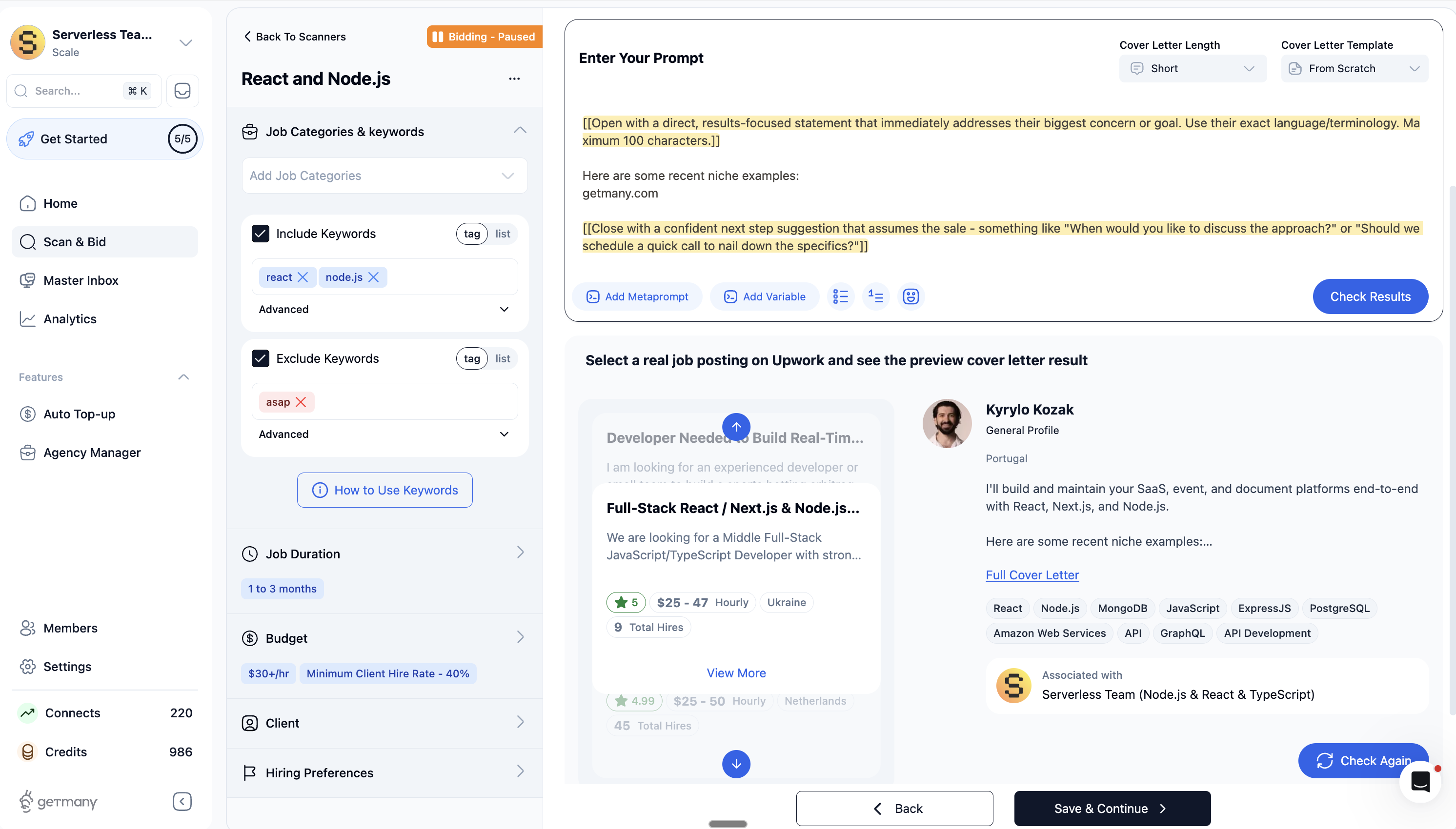
GetMany's AI Cover Letter feature solves critical challenges for your upwork account:
- Volume at scale: Submit 5-10x more quality proposals per day without hiring additional staff
- Personalization at speed: Each cover letter references specific job details, client needs, and relevant portfolio work automatically
- Multi-account management: Seamlessly coordinate proposals across team members or multiple specialized profiles
- Smart job matching: AI filters opportunities by budget, skill fit, and client history to focus your connects on high-probability wins
- Time recovery: Reclaim 25-30 hours per week previously spent on repetitive proposal writing
Agencies using GetMany's AI Cover Letter generator report 40-60% higher response rates compared to manual approaches, primarily because they can respond within the critical first 2-hour window for every relevant job posting. Your upwork account stops competing on speed and starts winning on relevance and timing.
The platform learns from your successful proposals, adapts to different job types, and allows for manual review before submission. This hybrid approach lets you maintain quality control while dramatically expanding your upwork account's reach and win rate in 2026's competitive landscape.
Step 4: Accelerating Early Success - First Clients, Reviews, and Social Proof
Getting your upwork account off to a strong start is all about momentum. The first few weeks can feel like an uphill climb, but with the right tactics, you can quickly land those vital first clients. Early wins set the tone for your reputation, build confidence, and boost your visibility on the platform.
Landing Your First Upwork Job
To kickstart your upwork account, target smaller projects with fewer applicants. These jobs may pay less, but they offer a higher chance of selection and let you build credibility fast. Consider offering a discounted first milestone or a paid trial to lower the client’s risk and showcase your skills.
Using the “Rising Talent” badge and Project Catalog can also help your upwork account stand out. Many new freelancers who secure their first job within 30 days see long-term success.
Delivering Exceptional Client Experience
Winning the job is only half the battle - delivering a top-tier client experience is what turns one project into many. Start every project by confirming the scope, timeline, and deliverables in writing. Send regular updates, answer questions quickly, and be proactive about potential issues.
Aim to exceed expectations on quality and delivery speed. Freelancers with a 24-hour response time on their upwork account often maintain higher Job Success Scores. Remember, happy clients are more likely to return and refer you to others.
Collecting Reviews and Building Social Proof
After a successful project, always request feedback using a polite, personalized template. Encourage clients to mention specific outcomes or results in their review. These detailed testimonials make your upwork account more attractive to future clients.
Showcase your best reviews in your proposals and portfolio. Data shows that profiles with five or more reviews get more than twice as many invites. Social proof is your currency - invest time in collecting it early.
Handling Rejection and Staying Consistent
Rejection is part of every upwork account journey. Instead of feeling discouraged, analyze declined proposals to spot patterns or areas for improvement. Consistency is key - apply to 10 to 20 jobs per week to keep your momentum going.
Persistence pays off. Freelancers who maintain a steady application rhythm tend to land more interviews and build a stronger upwork account foundation.
Avoiding Common Mistakes
Don’t fall into the trap of sending generic proposals or underpricing your services. Overcommitting or being unclear about deliverables can lead to poor reviews on your upwork account. Focus on the quality of each application, prioritize communication, and make sure you’re clear about what you’ll deliver.
Avoiding these missteps early on will help your upwork account earn positive feedback, repeat clients, and a stellar reputation that fuels long-term growth.
Step 5: Optimizing and Scaling Your Upwork Account
Optimizing your upwork account is the key to unlocking lasting growth. As competition intensifies, freelancers and agencies need more than just a polished profile. Scaling your upwork account means tracking metrics, building client loyalty, and expanding your reach beyond the platform. Ready to take your upwork account to the next level? Let’s break down the most effective strategies.
Monitoring and Improving Key Metrics
Your upwork account’s visibility hinges on a few crucial stats. Job Success Score, responsiveness, and repeat hire rate now appear front and center to clients. If you want your upwork account to attract premium projects, keep contracts active, close out completed work promptly, and update your profile with new case studies.
Here’s a quick comparison:
Metric | Impact on Upwork Account | Client Perception |
|---|---|---|
Job Success Score | Search ranking | Trust and reliability |
Responsiveness | Invite rate | Professionalism |
Repeat Hire Rate | Profile visibility | Long-term value |
Regularly refreshing your upwork account keeps you top of mind for new opportunities.
Raising Rates and Positioning for Premium Clients
Once your upwork account features glowing reviews and a solid track record, it’s time to level up. Raise your rates after five or more successful contracts. Clients often equate higher rates with higher quality, so don’t be afraid to repackage your services into basic, standard, and premium tiers.
For example, freelancers who increased their rates after building their upwork account’s reputation saw a 20% jump in contract value. Use your upwork account portfolio to showcase premium outcomes, and you’ll naturally attract bigger budgets.
Building Repeat Business and Referrals
Turning one-time clients into loyal partners is the secret sauce for a thriving upwork account. Follow up after project delivery with a thank you and offer maintenance or follow-up packages. Request testimonials, and don’t hesitate to ask satisfied clients for referrals.
Consider these steps:
- Send a personalized check-in message
- Offer discounts for returning clients
- Share portfolio updates and new services
Upwork account holders who nurture relationships see more invites and steady income streams.
Leveraging Specialized Profiles and Niche Targeting
Standing out in a crowded upwork account marketplace means embracing specialization. Create multiple specialized profiles for your top skills or industries. Data shows that niche-focused profiles command 30 to 50 percent higher rates than generalist ones.
If you’re curious about the latest freelance shifts, check out Freelance Trends Shaping 2026 for inspiration. A laser-focused upwork account signals expertise and attracts clients looking for specific solutions.
Scaling as an Agency: Teamwork and Workflow Automation
Thinking about transforming your upwork account into an agency? The move lets you manage teams, submit more proposals, and handle larger contracts. Agencies can assign roles, automate workflows, and track analytics for smarter scaling.
For a deeper dive on the differences, visit Agencies vs. freelancers on Upwork. Agency upwork accounts that leverage automation can submit 5 to 10 times more quality proposals each day, boosting win rates and fueling rapid growth.
Diversifying Lead Sources Beyond Upwork
The most successful upwork account owners don’t rely solely on one platform. Build a presence on LinkedIn, launch a personal website, and share case studies on industry forums. Many top upwork account earners report that over 35 percent of new business comes from off-platform referrals.
Content marketing, networking, and showcasing your best work elsewhere will help you weather platform changes and keep your pipeline full. Diversifying your lead sources is a smart move for any upwork account aiming for long-term success.
Navigating Upwork’s Policies, Fees, and Support in 2026
In 2026, understanding the rules around your upwork account is more important than ever. As the freelance economy grows rapidly, Upwork continues to refine its platform, policies, and support features. Staying on top of these changes ensures your upwork account stays secure, compliant, and profitable.
Understanding Upwork’s Updated Fee Structure
Upwork’s fee structure in 2026 uses a sliding scale based on total billings per client. This means the more you earn with a client, the lower your fees over time. For example, your upwork account will start at a 20% service fee for the first $500 billed to a client, then drop to 10% for billings up to $10,000, and finally 5% for anything above that.
Here’s a quick comparison:
Lifetime Billings per Client | Service Fee |
|---|---|
$0–$500 | 20% |
$500.01–$10,000 | 10% |
$10,000.01+ | 5% |
These changes reflect the broader growth in the freelance industry, as projected in the Freelance Platforms Market Growth Forecast, making it vital to understand how fees impact your upwork account profitability.
Key Policy Changes Every Freelancer Should Know
Upwork’s policies have evolved to address new technology and client needs. In 2026, rules around AI-generated content are stricter, requiring transparent disclosure and proof of human oversight. Communication guidelines emphasize keeping client chats on-platform for transparency and dispute protection.
The dispute resolution process is now more efficient. In 2025, 92% of disputes were resolved through Upwork’s mediation process, showing the platform’s commitment to fairness. Always review the latest policy updates in your upwork account dashboard to avoid accidental violations.
Account Security and Compliance
Protecting your upwork account is essential, especially with increased cyber threats. Upwork requires two-factor authentication for all users. Regular compliance checks help prevent fraud and ensure your tax information is up to date.
For international freelancers and agencies, make sure to submit accurate legal and tax documents. This keeps your upwork account in good standing and avoids payment delays. If you notice any suspicious activity, contact support immediately.
Support, Disputes, and Ongoing Updates
Upwork offers several support channels to help you manage your upwork account. Use the community forums for peer advice, the help center for step-by-step guides, and live chat for urgent issues. Support is available 24/7 for most account concerns.
To stay ahead, follow Upwork’s blog, attend platform webinars, and read update emails. This way, your upwork account will always reflect the latest requirements and best practices. Staying informed is your best defense against unexpected changes.
Ready to put these expert Upwork steps into action and see real results? Imagine saving 30 hours a week, automating your proposal process, and finally having time to focus on growing your agency or freelance business. That’s exactly what Getmany empowers you to do - no more burning out over repetitive tasks or missing out on high value projects. If you’re curious how agencies worldwide are winning more jobs with less effort, why not experience it for yourself? Let’s make your Upwork journey in 2026 smoother, smarter, and a whole lot more fun. See Getmany in action